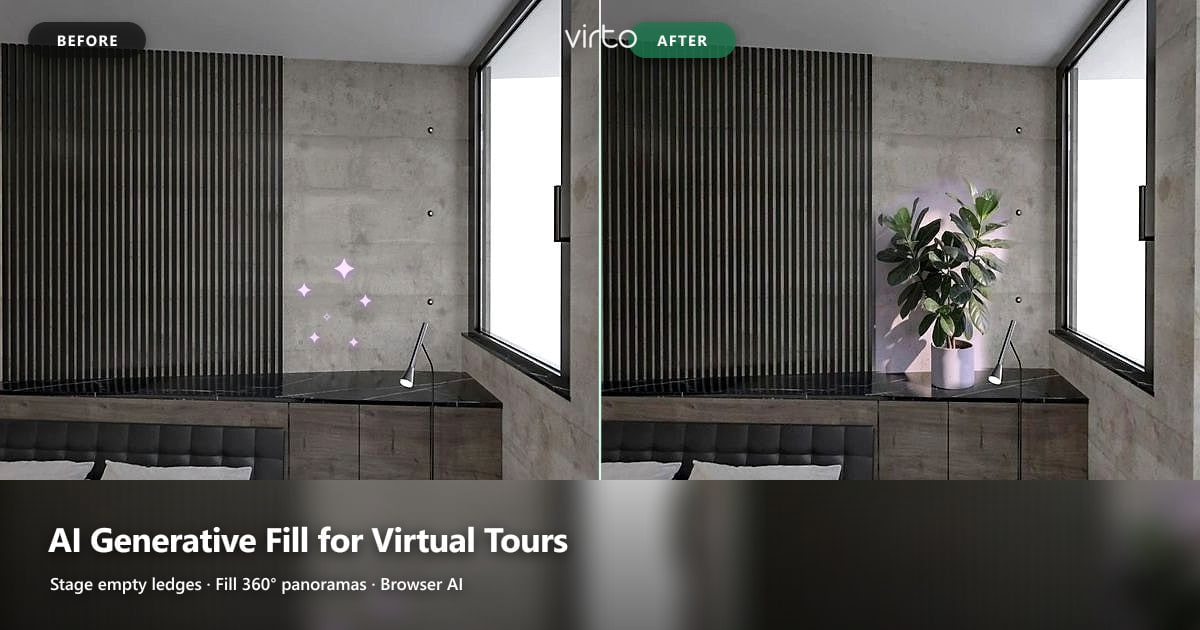
AI Generative Fill for Virtual Tours: Stage Empty Corners in 360°
Object removal cleans a scene. Generative fill answers a different question: what should sit on that empty ledge? How to use AI fill inside a 360° virtual tour without turning listings into fiction.
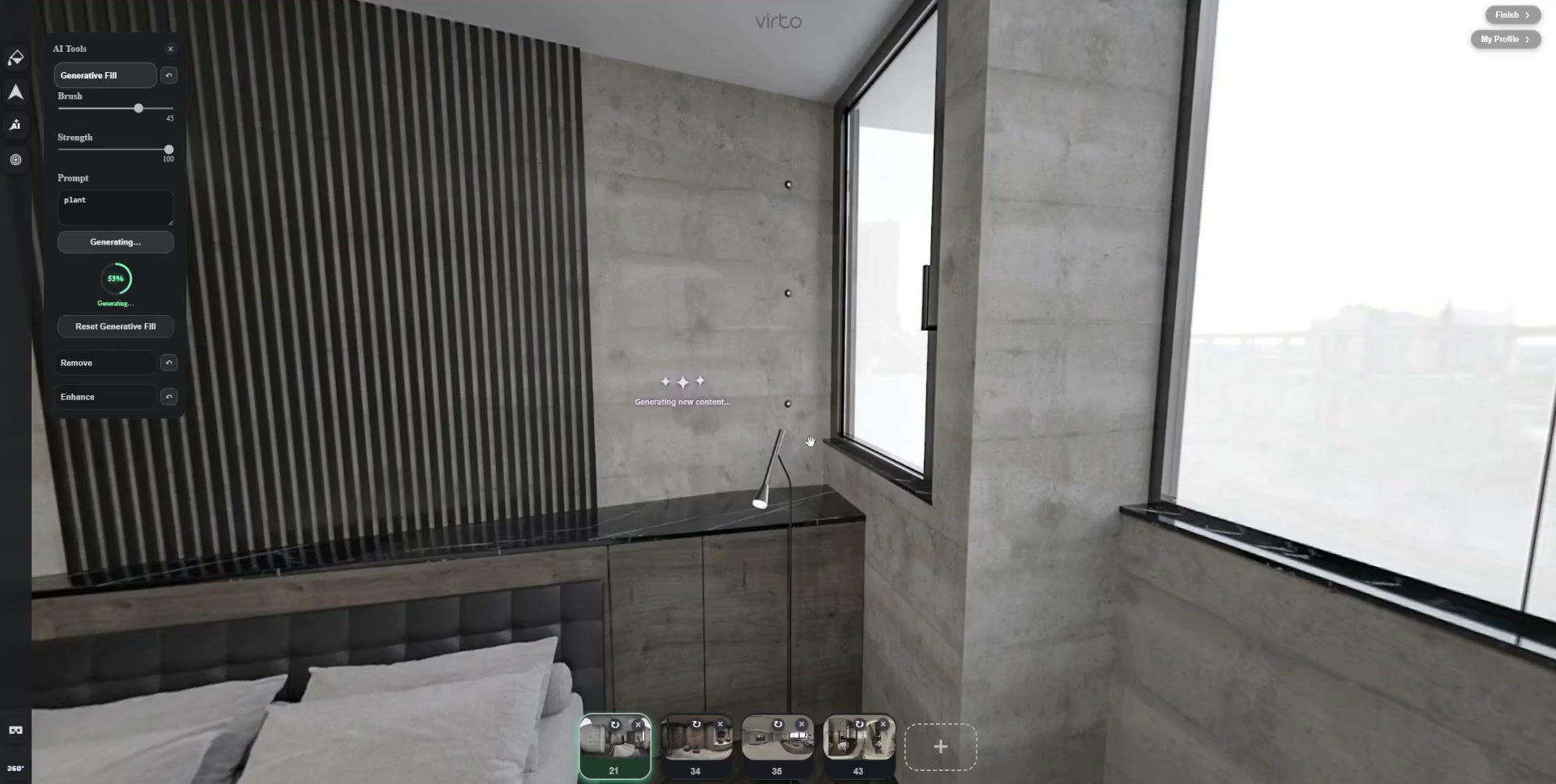
Most agents already know how to delete a cable. Fewer people talk about the opposite job: the marble ledge that photographs empty, the rental bedroom that looks unfinished, the corner that needs one plant so the first pan does not feel sterile. That is generative fill — you mark a region, describe what should land there, and the model paints into the 360° sphere.
Virto 360 keeps that step in the same browser tab as hotspots and filters. You do not export the equirectangular to a separate editor, rename files, and rebuild the tour. Mask, generate, look left and right on the sphere, publish. This article stays on fill specifically; our broader AI guide covers remove and enhance as a set.
Generative fill vs object removal — different verbs
- Object removal asks: erase this distraction and invent floor/wall underneath
- Generative fill asks: invent something new inside a masked empty or damaged area
- Filters ask: change tone everywhere without inventing objects
- Use remove for tripods and clutter; use fill for staging accents and sky patches
Confusing the two burns time. Brushing a whole sofa and prompting “modern chair” is not staging — it is redesign. Brushing the empty strip of ledge beside a lamp and prompting “green potted plant” is the size of change that still matches what a visitor will see on walkthrough day.
When generative fill earns its place in a virtual tour
- Empty shelves and ledges that make a bedroom look unoccupied
- Small sky or window patches that are blown white after HDR
- Plain wall scars or paint patches you cannot reshoot before listing day
- Subtle greenery or soft props that match the rest of the room’s style
Skip fill when the room needs furniture the buyer expects in person, when the “view” through the glass would become a different city, or when the masked area covers more than a modest fraction of what the viewer sees. Equirectangular AI already struggles at poles and seams — large fantasies fail harder than flat phone photos.
Prompts that work on 360° panoramas
Short wins. “Green rubber plant in grey pot”, “soft overcast sky”, “folded beige towel on shelf”. Long stories about lifestyle and brand mood confuse the mask. Match materials you already see — concrete, marble, oak — so the fill does not introduce a second design language.
- Name the object and one material or color
- Avoid camera brands, lens jargon, or “8K ultra realistic” filler
- Retry with a tighter mask before you rewrite the whole prompt
- If edges glow purple or pink, undo — usually the mask bled into the wall
An honest workflow agents and hosts can repeat
Ethics: staging help vs false advertising
A plant on a ledge is staging. A swimming pool painted into a courtyard that has none is fraud. Hotels swapping a parking-lot window for ocean glass will hear about it in reviews. Ask one question before you accept a fill: would a guest feel tricked standing in that spot? If yes, reshoot or leave the raw frame.
Real estate, rentals, and architecture — same tool, different bar
Listing agents use fill to finish sparse staging between photographer visits. Short-term hosts hide barren shelves after furniture delivery delays. Architects sometimes fill a temporary construction prop out of a rendered 360 — fine when the final build will match. Architects inventing finishes the client never approved — not fine. Document what you changed if the tour supports a contract.
After fill: filters and a last mobile check
Generative fill is local. If the whole room still looks cold or flat, use filter editing for brightness and warmth so the new plant does not sit in a mismatched grade. Then open the published tour on cellular data. Phone viewers look up and down more than desktop QA — that is where fringe and nadir mistakes show.
Try one ledge before you rebuild the shoot
Pick the emptiest scene in your current folder. Upload it into a test tour, mask the ledge, run generative fill once, and decide in sixty seconds whether a reshoot is still worth the drive. If the fill holds while you pan, keep going. The product page for this tool is AI generative fill for 360 photos. New to the editor? Start with how to create a free virtual tour, then come back here when the walkthrough already clicks.
Where to go next
Product page: AI generative fill for 360 photos. Overview: AI virtual tour software. Platform overview: virtual tour software.
Frequently asked questions
What is AI generative fill in a virtual tour?
You brush a region on a 360° panorama and describe what should appear there. The model paints into that mask — useful for light staging and small sky repairs inside the tour editor.
Is generative fill the same as AI object removal?
No. Removal deletes something and rebuilds background. Generative fill invents new content in an empty or damaged area. Most cleanups need both tools at different moments.
Can I add furniture to a real estate virtual tour with generative fill?
Small props and plants usually work better than full sofas or beds. Large furniture often breaks perspective on equirectangular images and can mislead buyers if the room will be empty at showing.
Will generative fill change my original camera files?
Virto keeps the edited panorama for the tour. Keep your original Theta or Insta360 exports on disk until the client signs off.
Do I need desktop software for generative fill on 360 photos?
Not with Virto 360 — fill runs in the browser on the same panorama you hotspot and publish.
How do I keep generative fill looking natural?
Mask tightly, use short material-aware prompts, check edges while spinning the sphere, and preview on mobile before you republish.