AI Virtual Tour Software for 360° Tours
AI virtual tour software for 360° tours: object removal, generative fill and enhance in the same browser as hotspots and publish. Free on Virto 360.
Quick answer: AI virtual tour software for 360° tours: object removal, generative fill and enhance in the same browser as hotspots and publish. Free on Virto 360.
AI virtual tour software is virtual tour software with the slow part of the job inside the same browser: clean a panorama, connect rooms, publish a link. Not a separate photo app you export to. Not a chatbot that invents a tour from a prompt.
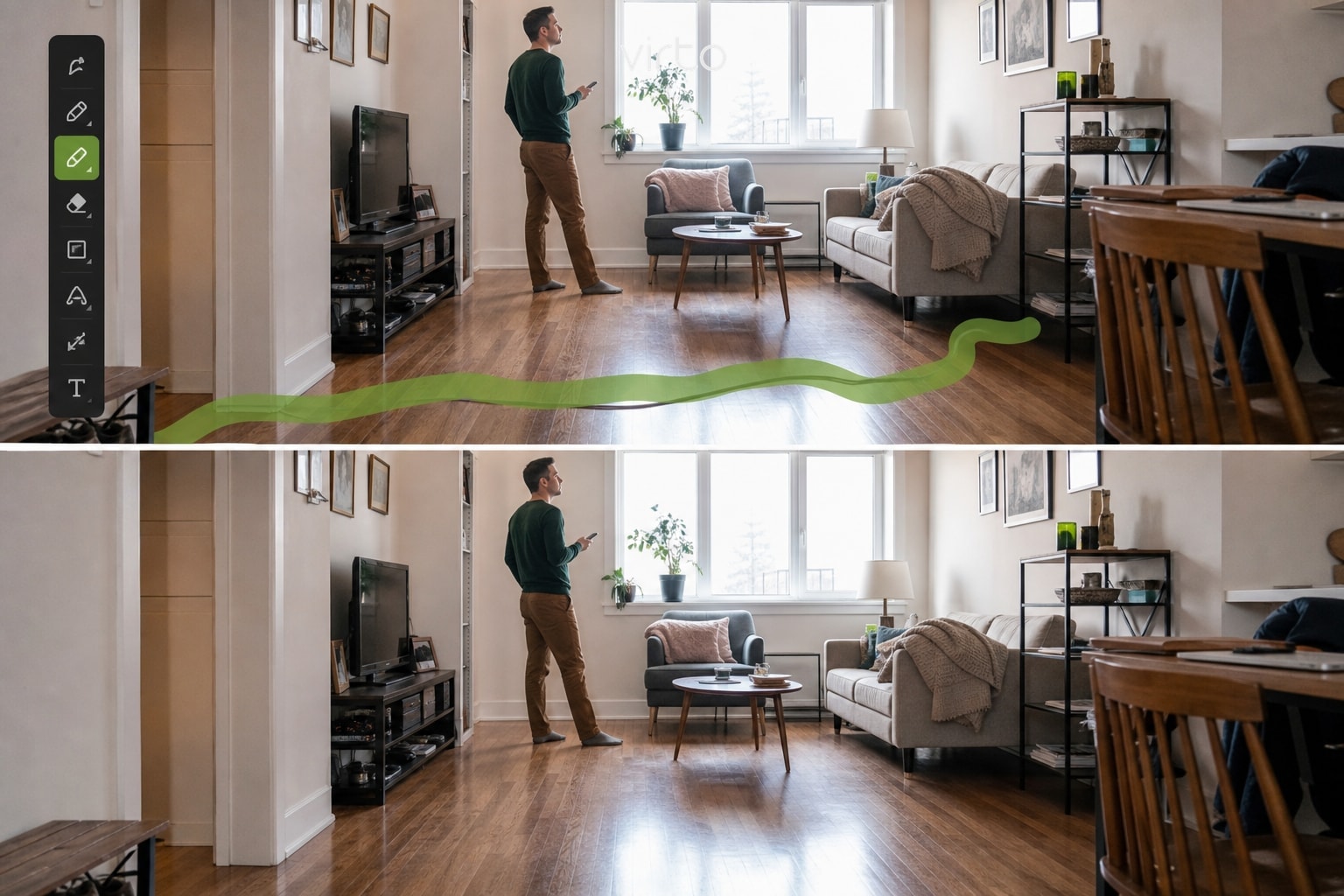
See AI Object Removal in action
Brush an unwanted object, remove it, keep editing the tour — then walk the published 360° below.
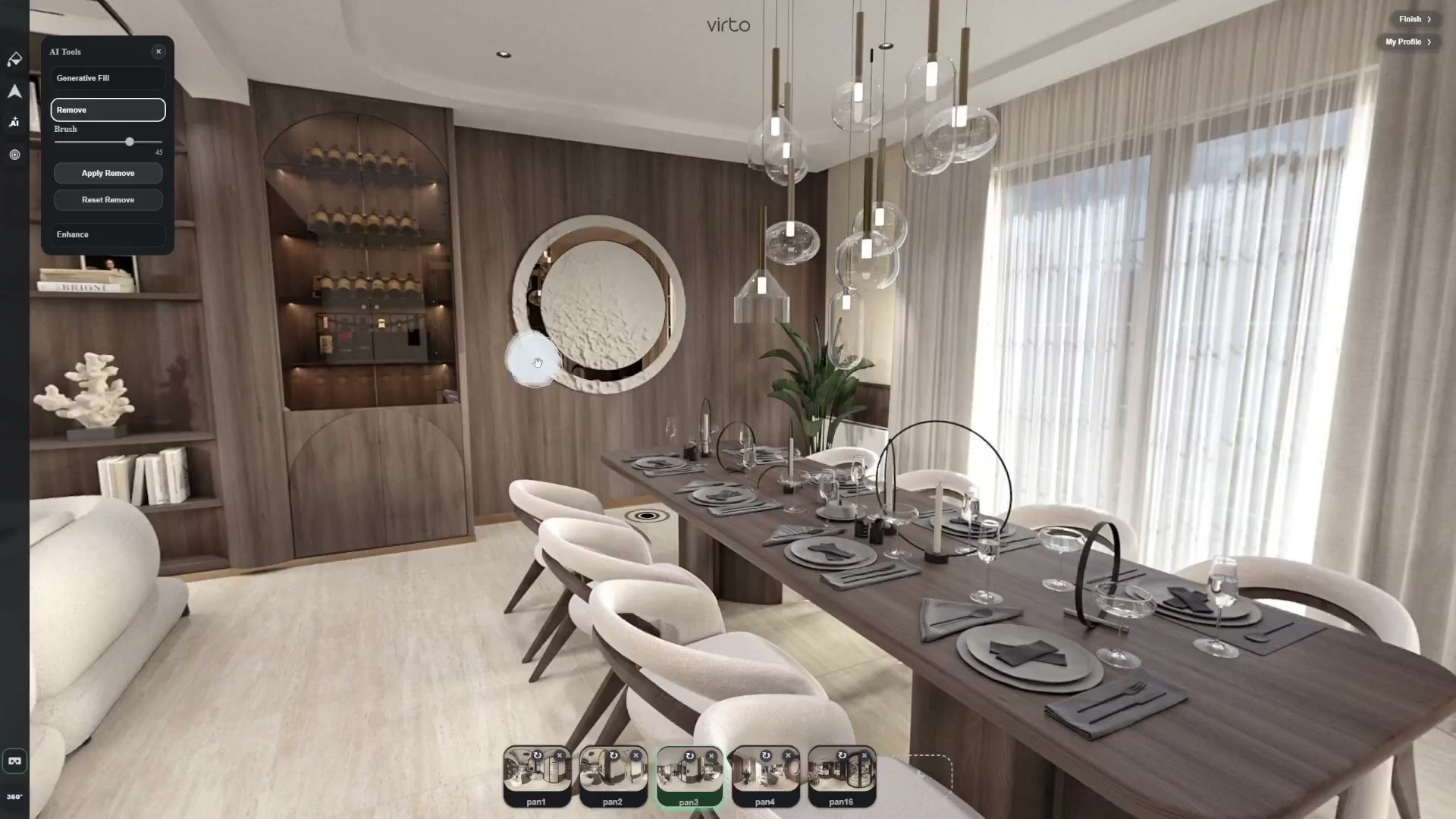
See what you can create
Explore a live 360° virtual tour — pan, zoom and walk room to room. The same editor that published this walkthrough is where AI object removal, generative fill and enhance run.
What AI virtual tour software actually is
Most teams already have the photos. A Ricoh Theta, an Insta360, a drone, or a render from Enscape. The delay is everything after capture: a tripod in the nadir, a cable on the floor, a blown window, a room that looks muddy at dusk.
If that work lives in Photoshop, you export, edit, export again, re-upload, and hope the equirectangular edges still match. Virto 360 keeps it in the same editor as the tour.
AI object removal, generative fill and enhance run on the panorama you are already building. When the scene looks right, you add hotspots and publish. Viewers never see an AI app. They open a normal share link.
The platform itself is Virtual Tour Software. This page is the AI layer. Plan facts (watermark, card, hosting) live on the Virto 360 free plan.
How Virto uses AI inside a real tour workflow
The useful order is almost always: upload equirectangular panoramas, AI-edit only the scenes that need it, connect rooms with hotspots, then publish a link, QR or iframe.
AI is step two, not the identity of the whole product. Use it where a reshoot would cost more than a careful brush.
From panorama to published tour
- Open the scene — Upload or pick the panorama that needs work.
- Choose the AI tool — Remove for clutter, Fill for a patch, Enhance for the whole frame.
- Preview in 360° — Pan and look down. Edges that look fine in a crop can fail at the nadir.
- Connect rooms — Hotspots, opening views, a walk that a client can follow.
- Publish — Link, QR or embed. Guests do not install anything.
AI Object Removal
A tripod, a bag, a towel, someone walking through the frame — small on a flat photo, huge in 360°, because viewers can look down and behind themselves.
Brush the object. Virto reconstructs the floor, wall or fabric behind it. You stay in the panorama.
Product page: Remove objects from 360° photos with AI.
AI Generative Fill
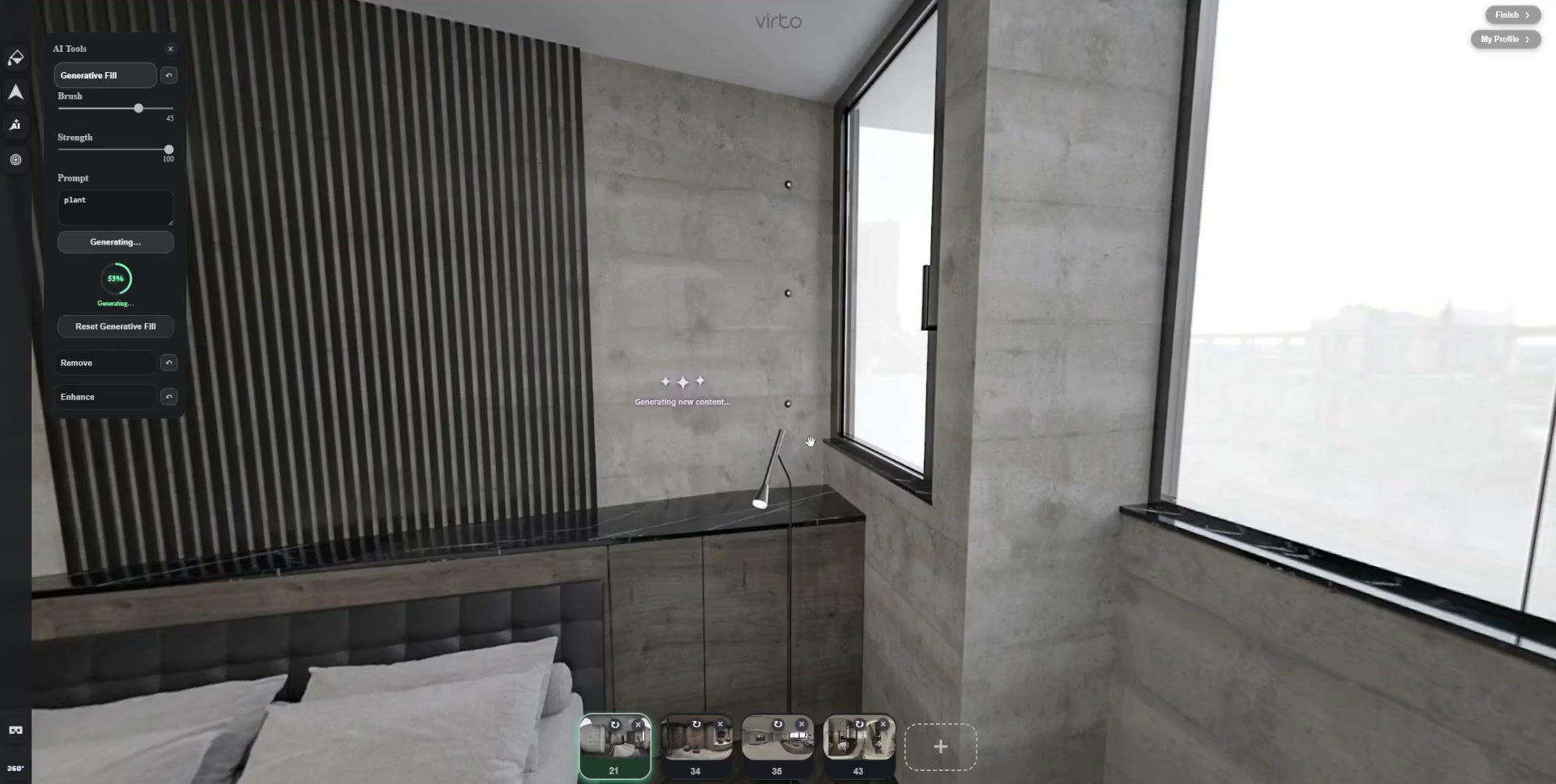
Removal deletes. Fill answers a different question: what should sit in this empty patch? A blank ledge, a dull corner, a small blown sky.
Mask tightly, describe the fill in a few words. The honest use is small staging and repair — not inventing a garden the buyer will not see.
Product page: AI generative fill for 360° photos. Guide: AI Generative Fill for virtual tours.
See AI Generative Fill in action
Paint an empty ledge and add a simple fill without leaving the 360° editor.
AI Enhance
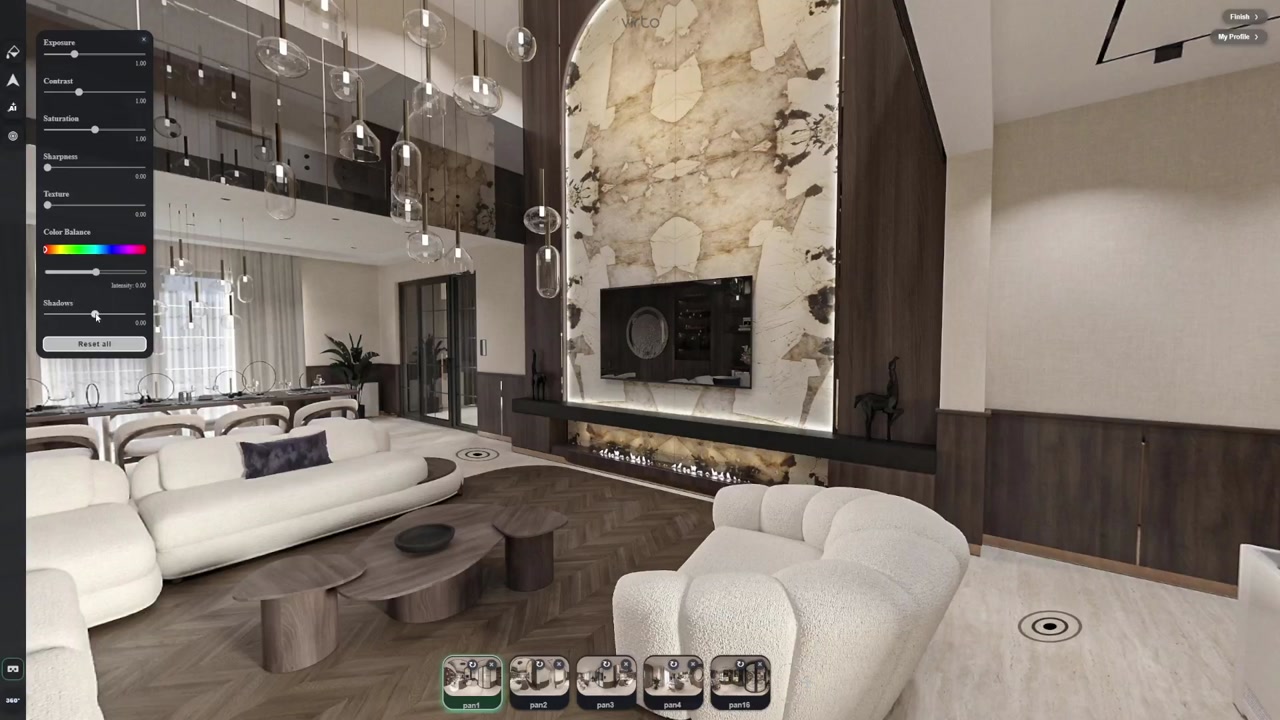
Enhance is a global polish: exposure, clarity, texture, a less muddy room after a rushed dusk shoot. It is not a brush, and it is not a contrast slider.
If wood grain starts looking plastic, undo. Enhance is the last AI pass. Manual filters still exist when you want control without a model.
Details: AI enhance for 360° photos.
Polish a 360° panorama
Enhance for one-click quality; filters when you want to steer the look yourself.
AI virtual tour software for architects
Enscape, Twinmotion and similar tools already give you 360° viewpoints of an unbuilt project. The missing piece is a guided presentation: a start view, hotspots through the programme, a URL a client can open on a phone.
AI here is optional cleanup — proxy clutter in a render, a blown sky, a leftover section cut — not a replacement for the model. Walk a live architecture tour on the dedicated page, then come back here for the AI tools.
Industry page: virtual tour software for architects. Workflow article: AI virtual tour software for architects.
AI virtual tour software for real estate
Listing tours fail on small honest mess: a cable, a tripod, a staging leftover. AI cleanup is useful when it presents the real home clearly — not when it invents a different property.
Shoot, upload, remove what should not be in the frame, connect rooms, publish a link or QR for the open house. MLS and portal rules still apply: do not hide defects.
Industry page: virtual tour software for real estate. Camera-to-listing guide: AI virtual tour software for real estate.
AI virtual tour software for photographers
A tripod in the nadir or a passer-by in the lobby should not send the whole delivery back through a desktop suite. Clean the panorama, connect scenes, send the client link from the same tab.
Keep originals. Use AI for limited cleanup, then finish hotspots and share. That is the photographer workflow this hub is built for.
Guide: AI virtual tour software for photographers. Object removal product page: AI object removal for 360 photos.
Hotels, rentals and other interiors
Guests notice towels, cleaning kits and temporary clutter more in 360° than in a still. Clean the room tour, keep the layout honest, put the link on the room page.
Industry page: virtual tour software for hotels.
Guides in this hub
Product pages for each AI tool, then industry walkthroughs and supporting articles.
AI tools
Each tool has its own page — this hub is the parent.
Industries
How AI editing shows up in real jobs — these pages also feed this hub.
- Architects: Virtual tour software for architects
- Real estate: Virtual tour software for real estate
- Photographers: Photographers: edit and deliver
- Hotels: Virtual tour software for hotels
Guides
Supporting articles.
Who uses AI virtual tour software
- Real estate — Listing tours fail on small honest mess: a cable, a tripod, a staging leftover. AI cleanup is useful when it presents the real home clearly — not when it invents a different property. Virtual tour software for real estate
- Architects — Enscape and Twinmotion already give you 360° viewpoints. The missing piece is a guided presentation: hotspots, a share URL, optional cleanup of proxy clutter or a sky patch. Virtual tour software for architects
- Photographers — A tripod in the nadir or a passer-by in the lobby should not send the whole project back through a desktop suite. Clean the panorama, connect scenes, send the client link from the same tab. Photographer workflow
- Hotels & rentals — Guests notice towels, cleaning kits and temporary clutter more in 360° than in a still. Clean the room tour, keep the layout honest, put the link on the room page. Virtual tour software for hotels
FAQ
What is AI virtual tour software?
Virtual tour software that includes AI editing in the same workflow as building and publishing the tour. In Virto 360 that means object removal, generative fill and enhance on 360° panoramas, then hotspots and a share link — all in the browser.
Is the Virto 360 homepage the AI virtual tour software page?
No. The homepage is Virtual Tour Software — the full platform. This page is the AI virtual tour software hub. Feature details live on Object Removal, Generative Fill and Enhance.
Do viewers need an AI app?
No. AI runs while you edit. Guests open a normal share link or embed.
Which cameras work?
Any equirectangular 360° export — Ricoh Theta, Insta360, drone stitches, and architecture renders.
Is AI on the free plan?
Yes. There is no separate AI credit pack for normal listing cleanup. Plan facts: Virto 360 free plan.
Object removal or generative fill?
Removal when something should disappear. Fill when a patch needs content. Enhance when the whole frame needs a light quality lift.